


ezClocker: Employee Time Track
4.6336.00 Reviews
App Specs
- Version
- 3.27.1
- Updated On
- License
- Free
- Downloads
- 100,000+
- Developer
- ezNova Technologies DBA ezClocker
- Categories
- Business
- Platform
- Android
Screenshots
 Analysis by AppCompare
When staff work across several places or start at different times, small gaps in timekeeping can turn into a weekly headache. I see ezClocker: Employee Time Track as a practical fit for a small team that wants a shared routine for shifts and clock-ins rather than a complicated workforce platform. Its usefulness depends partly on how reliably employees and managers can get online at the moments they need it, so I’d think through your team’s usual work settings before making it the center of your process.
Where a connection matters
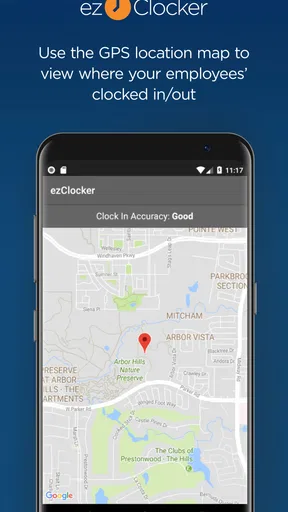
The key moments are the ones when an employee needs to clock in or out, check a shift, or communicate with a manager. A GPS check adds a location-related step to clocking in, which can help a business confirm that a person is at the expected job site. In practice, this makes the app more relevant to crews moving between customer locations than to a team that sits together and can simply tell a supervisor when it arrived.
I would build a clear routine around those moments: employees should know which location or job site to use, when to record a time entry, and whom to contact if the app does not behave as expected. That simple agreement matters as much as the software. It gives a manager a consistent record to review instead of trying to reconstruct a shift from messages or memory.
Designed for work on the move
For a small cleaning crew, landscapers, repair staff, or other people who begin the day away from an office, phone-based timekeeping can be more convenient than a paper sheet kept at one site. A manager can organize shifts while employees use their phones to check their schedule and record their time. That is a useful division of labor: planning can happen at a desk, while attendance is handled where the work starts.
There is a trade-off, though. A phone is not always ready at the exact moment a shift begins: it may have a weak signal, a nearly empty battery, or competing demands from the job. I would ask employees to keep the app accessible and make clocking in part of their arrival routine, rather than waiting until they are busy. If the work regularly takes people into places with unreliable connectivity, test the whole process at those sites before relying on it for payroll records.
What to do when something goes wrong
Time records deserve a recovery plan. If an employee cannot complete a clock-in, the manager needs a consistent way to find out what happened and decide how to correct the record. A short message with the employee’s name, shift, location, and approximate start time is more useful than a vague “the app failed.” I would agree on that backup procedure in advance, then compare any manually reported time with the app’s timeline before approving hours.
This is also why I would not treat GPS verification as a substitute for communication or supervision. It can add context to a clock-in, but managers still need a fair process for exceptions, such as a delayed start, a changed job site, or a phone problem. Make sure employees understand how to report a mismatch without feeling that one technical hiccup automatically means their work will not be counted.
Worth Reading Before You Choose

EA SPORTS FC Mobile 26 Is a Bigger Football Game, but It Takes Time

Flipboard Shows What News Apps Must Do Beyond the Feed

Switching to Android Auto Means Rethinking Your Driving Routine

Google Calendar Makes a Crowded Week Easier to Manage

Ludo King Makes the Most of the Minutes Between Plans

Baby Panda World Brings Quick Play to Modern Phones, but Its Game Library Feels Busy
Keep the records useful and proportionate
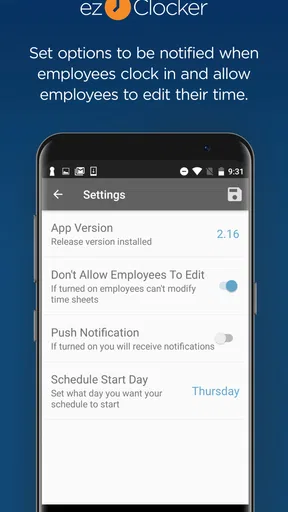
Because time and location information concerns employees, a business should be thoughtful about who can view it and why. The app’s role and permission controls can help a manager limit access to the people who need it. I’d keep those permissions narrow, explain the purpose of GPS verification to staff, and avoid collecting or reviewing information simply because it is available. A transparent policy is better for trust and makes it easier to resolve disagreements about attendance.
Before a busy week, I’d also check that the team list, job locations, and shift schedule are current. That small housekeeping step can prevent avoidable confusion when someone transfers to another site or covers for a coworker. It is especially useful for businesses with more than one location, where an outdated setup can make a correct clock-in look like an exception.
First Impressions
When I first downloaded ezClocker, I was impressed by its clean and intuitive interface. You know how some apps try to cram everything onto one screen? Not this one. It’s like the app just gets you. Everything is laid out simply, making it super easy to navigate. I didn’t need a manual to get started, which is always a plus in my book.
Getting Started
Setting up the app was a breeze. After a quick registration, I was all set to add my team. The app allows you to input employee details, assign roles, and set up locations if you’re dealing with multiple job sites. I found it particularly helpful that you can customize roles and permissions, which means I can decide who gets to see what.
That setup is worth treating as a small project rather than a task to rush through. If employees are assigned to different locations or managers, check the roles before inviting everyone to rely on the schedule. I would also start with a straightforward test: have one person check a shift and record a sample workday, then review how the timeline reads from the manager’s side. This helps reveal confusing naming or permission choices before they affect a full crew.
Clocking In and Out
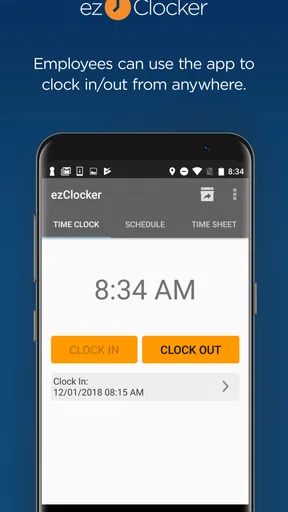
The main feature, obviously, is the time tracking. Employees can clock in and out with just a tap. But here’s the cool part: the app supports GPS verification. So, if you’re worried about where your team is clocking in from, this feature has got you covered. I’ve had peace of mind knowing that my crew is where they say they are.
For a realistic example, imagine a small maintenance team starting at different properties on the same morning. The schedule tells each person where they are expected, and the clock-in record gives the manager a reference point when checking attendance. If one employee is sent to a different property at short notice, the manager should make sure the schedule or location arrangement reflects the change; otherwise, the record may need explanation even though the employee followed instructions. That is a useful operational lesson: GPS is most helpful when the planned work location is kept current.
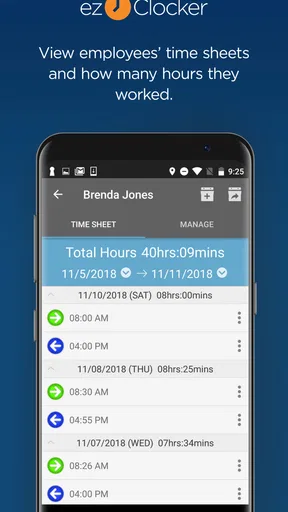
What’s more, the app records all the clock-ins and outs, which you can view in a simple timeline. It’s like having a digital punch card system without the hassle of paper.
A timeline is valuable not only at payday but also when a manager needs to spot a pattern, such as missed clock-outs or frequent last-minute schedule changes. I’d review entries regularly, while the details are still easy for the employee to remember, instead of waiting until payroll is due. That does not remove the need for a clear correction process, but it makes discrepancies less likely to become a larger argument later.
Managing Payroll
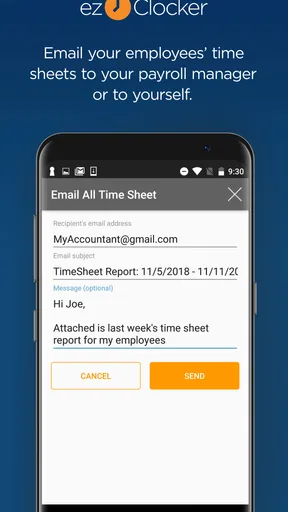
One of the standout features of ezClocker is its payroll management tool. It automatically calculates hours worked, which you can then export for payroll processing. This feature has saved me countless hours, not to mention reduced the risk of human error. It’s straightforward and integrates well with existing systems, making payday a whole lot smoother.
I would still treat the calculated hours as a review step, not as a reason to skip payroll checks. A manager should look for missing punches, unusual totals, and shifts that changed location or timing before using an export. The timekeeping record can make the handoff cleaner, but the business remains responsible for confirming that the hours are correct and that its payroll process handles them properly.
Compared with a paper timesheet, this approach makes entries easier to organize and review. Compared with a broad workforce or payroll suite, it may feel more approachable for a small business that mainly needs shifts and attendance records. If you need a system built around complex approvals, extensive workforce planning, or specialized payroll administration, I would compare those requirements carefully before choosing a simpler time-tracking tool.
Communication and Scheduling
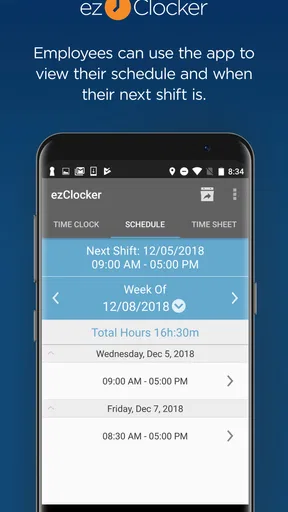
An added bonus is the app’s in-built communication and scheduling tools. You can send messages to your team directly through the app, which helps keep everyone in the loop. Scheduling shifts is also a breeze, and employees can check their schedules on their phones. No more excuses for missing shifts because someone “didn’t get the memo.”
For a manager, keeping shift information in one place can reduce the familiar shuffle between a paper rota, personal texts, and verbal changes. I’d use the schedule as the main reference and make changes there when a shift is swapped, then send a message when the change needs immediate attention. A message alone can be overlooked or separated from the schedule; using both for an important change gives the employee a clearer trail to follow.
The app is best suited to teams with repeatable shifts and a manager who can keep the schedule maintained. If your work changes by the hour and assignments are constantly improvised, a shared calendar or direct dispatch system may fit better. The right choice depends on whether a planned shift is a useful anchor for your workday or just a rough guess that is immediately replaced.
Security and Support
In terms of security, the app encrypts all data, which is a big deal when you’re dealing with sensitive employee information. The support team is also pretty responsive. I had a couple of questions about setting up different job sites, and they got back to me in no time. It’s nice to know you’re not alone if you hit a snag.
Connectivity is part of the practical decision, not just a technical detail. A team working mostly in places with dependable service is more likely to find phone-based clocking straightforward. For a crew that regularly works in basements, rural areas, or buildings with poor reception, I would test the workflow at those actual locations and keep the agreed backup method available. That way, a network problem does not become a dispute about whether someone worked a shift.
On Android, the app is free to install, with optional in-app purchases ranging from five to sixty dollars per item. It is rated for Everyone, and ezNova Technologies DBA ezClocker is the developer. The app has been available since September 8, 2013, and its current version is 3.23, with Android 7.0 as the minimum operating system. It has a 4.6 average from around 6,300 ratings, alongside 323 written reviews and over 100,000 installs. Those figures suggest that it is an established option, but I would still judge it by whether its timekeeping routine suits your own team.
The availability of Android and iOS versions, along with a web version, gives managers options for checking in from different devices. I would not assume that every workflow behaves identically across them; if staff use a mix of phones, test the specific tasks they need to do, especially checking schedules and clocking in at a location. This is a small step that can prevent confusion during rollout.
Who will get the most from it
I’d recommend considering it if you run a small operation where employees work scheduled hours across one or several job sites, and you want a simpler alternative to paper records. It can also suit a manager who needs to see shifts and time entries without building a large administrative system around them. A business moving from handwritten sheets may find the timeline and payroll export a practical bridge: the process becomes easier to inspect, while payroll can continue through the business’s existing method.
I would be more cautious if the team has highly irregular assignments, if workers cannot depend on a phone during the workday, or if the company needs a deeper, tightly connected payroll and workforce platform. The app’s straightforwardness is an advantage only when its core workflow matches the job. A larger operation with layered approval rules may prefer a system designed around those controls, while a very small team that works side by side may be perfectly well served by a basic shared record and direct communication.
Plans, expectations, and the final call
The app is free to get started, while optional purchases are available in the app. I’d review the purchase choices against the number of employees and the way the business plans to use the service before building a routine around it. The right question is not simply whether the app has a free entry point, but whether the features your team actually needs fit the ongoing cost and working process.
All in all, the ezClocker: Employee Time Track app is a solid choice for anyone who needs to track employee hours with minimal fuss. It’s intuitive, reliable, and packed with features that make managing a team much easier. Whether you’re running a small business or managing a remote team, I’d say give it a shot. It might just be the time-saving tool you didn’t know you needed.
My connectivity verdict
I see the strongest case for this app when the team can get online at the start and end of shifts, managers keep job locations and schedules current, and everyone knows how to report a problem. GPS verification, a readable time history, and shift planning can make a small team’s routine easier to supervise without turning it into a heavy administrative process.
The main caution is that mobile convenience depends on the real conditions employees face. Before switching everyone over, try the workflow at the actual work sites, confirm that staff can find the right shift and location, and agree on what to do if a clock-in cannot be completed. If that routine works, ezClocker is a sensible fit for basic attendance coordination; if connectivity is routinely poor or your operation needs more elaborate workforce controls, a different approach will likely be less frustrating.
Pros
- Simple interface that's easy to navigate.
- Supports GPS tracking for remote work.
- Allows manual time adjustments if needed.
- Affordable pricing for small businesses.
- Real-time data sync across devices.
Cons
- Limited reporting features available.
- No integration with payroll software.
- Lacks advanced project management tools.
- Requires internet for full functionality.
- Basic customer support options.
FAQs for ezClocker: Employee Time Track
What is ezClocker and how does it work?
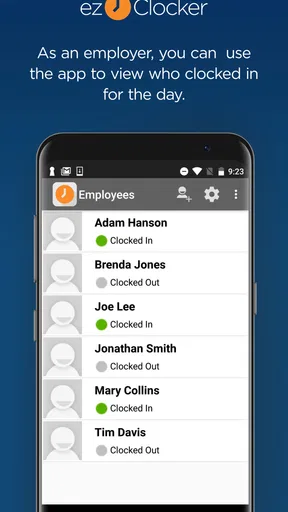
ezClocker is a user-friendly app designed to simplify employee time tracking and scheduling. It allows employees to clock in and out using their mobile devices, while managers can monitor attendance and work hours in real-time. The app provides an intuitive interface, making it easy for businesses to manage payroll and labor costs efficiently.
Is ezClocker suitable for small businesses?
Yes, ezClocker is ideal for small to medium-sized businesses. It offers an affordable solution for managing employee attendance without the need for expensive hardware or complex systems. The app’s scalability allows it to grow alongside your business, making it a versatile option for companies with fluctuating staffing needs.
What are the main features of ezClocker?
ezClocker includes features such as GPS-based clock-in and clock-out, employee scheduling, and real-time attendance tracking. It also offers payroll reporting, which simplifies the process of calculating work hours and overtime. The app’s user-friendly interface ensures that both employees and managers can navigate it with ease.
Is there a free version of ezClocker available?
Yes, ezClocker offers a free version with basic features suitable for very small teams. For more advanced features like extensive reporting and unlimited employees, there are paid plans available. The free version is a great way to test the app’s capabilities before committing to a subscription.
How secure is the data on ezClocker?
ezClocker prioritizes the security of user data by implementing robust encryption methods and secure servers. The app ensures that sensitive information such as employee work hours and personal details are protected from unauthorized access, providing peace of mind for both employers and employees.


